
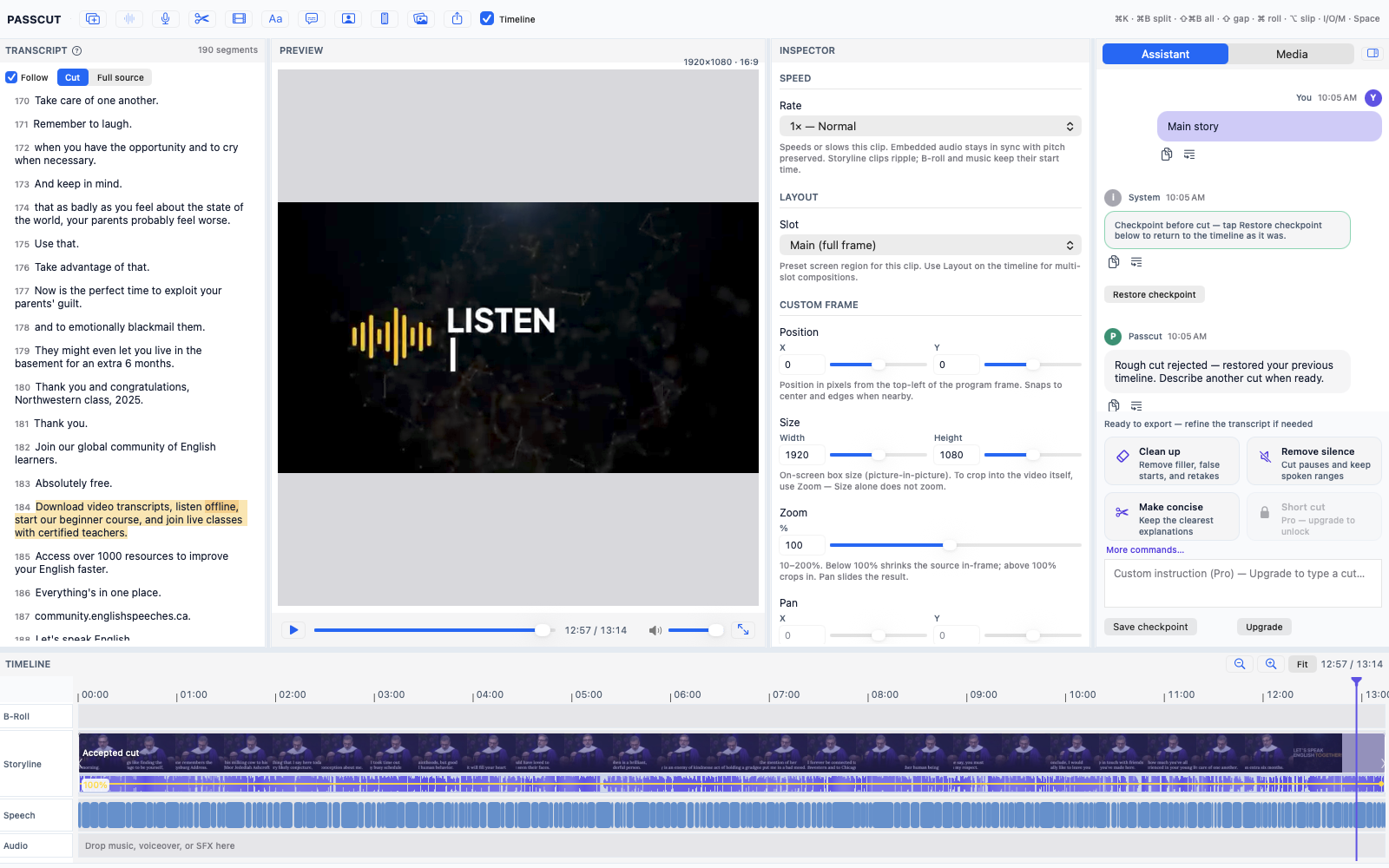
Turn raw footage into a rough cut from a plain-English instruction.
Passcut is a native macOS application built with Swift and AppKit on AVFoundation. Transcribe speech locally on Apple Silicon, type what you want to keep or cut, and review a frame-accurate assembly timeline before exporting FCPXML or MP4.
A rough cut is the initial assembly phase of video editing where raw camera takes are logged, trimmed, and ordered into a structured narrative timeline prior to color grading, audio mixing, and visual effects.
What is Passcut?
Passcut is a native macOS application built with Swift and AppKit on AVFoundation that automatically turns raw video footage into frame-accurate rough cuts using plain-English instructions. Running entirely on-device with Apple SpeechAnalyzer for transcription and Apple Foundation Models for instruction understanding, Passcut processes video local to your Mac without cloud uploads, accounts, or API keys. It outputs MP4 video, FCPXML, and EDL files for handoff to Final Cut Pro, DaVinci Resolve, and Premiere Pro.
Passcut eliminates the tedious scrubbing and manual logging required during first-pass video assembly. Import raw media files from your camera card, allow SpeechAnalyzer to index audio locally, and instruct Passcut in natural language.
- Native macOS app written in Swift and AppKit on AVFoundation for maximum hardware acceleration.
- Requires macOS 26 or later and a Mac with Apple Silicon Neural Engine.
- 100% on-device processing: zero video uploads, no accounts, no cloud servers, and no API keys required.
How does Passcut generate rough cuts on macOS?
Passcut transcribes video audio locally using Apple SpeechAnalyzer, feeds transcript text to Apple Foundation Models to evaluate plain-English instructions, and uses a deterministic audio silence engine to calculate exact frame boundaries without timestamp drift.
Because language models generate text probabilistically, relying on an LLM to output timecodes causes cut drift and clipped words. Passcut solves this by forcing the model to select transcript text spans, passing those selections to a deterministic audio engine that snaps cut points to silence energy boundaries and native video frames.
Why is 100% on-device privacy essential for video editing?
Passcut executes all speech recognition, instruction parsing, and video timeline rendering local to your Mac on Apple Silicon, ensuring confidential client video, corporate interviews, and embargoed media never touch cloud servers.
100% On-Device Privacy Guarantee
Passcut does not upload video, audio, or transcripts to external servers. It requires no user account creation, no internet connection, and no third-party API keys. Your footage stays on your Mac.
How does Passcut hand off rough cuts to Final Cut Pro and Resolve?
Passcut exports standard FCPXML and EDL project interchange files referencing your local raw media on disk, allowing professional video editors to import the generated timeline directly into Final Cut Pro, DaVinci Resolve, or Premiere Pro.
In addition to FCPXML and EDL project interchange formats, Passcut renders standalone MP4 video files directly on-device using AVFoundation hardware acceleration.
#Frequently Asked Questions
Is Passcut released or currently available?
Passcut is in pre-launch development. Join the waitlist to receive early access updates as soon as public beta builds are ready for macOS 26.
Are there any monthly subscription costs or plans?
Passcut is currently pre-launch and taking waitlist signups. There are no pricing tiers, subscriptions, or plans announced during pre-launch.
Does Passcut work on Intel Macs or Windows?
No. Passcut requires macOS 26 or later and a Mac with Apple Silicon (M1/M2/M3/M4 or later) to run Apple SpeechAnalyzer and Apple Foundation Models locally.
Will my video files ever be uploaded to cloud AI servers?
No. Video files, audio tracks, and transcripts never leave your Mac. All AI models execute 100% locally on Apple Silicon Neural Engine cores.
Get Early Access to Passcut
Passcut is currently in pre-launch. Join the waitlist to receive early access as soon as the native macOS build is ready.
Requires macOS 26 or later and Apple Silicon. No cloud processing, zero spam.